
Auto clicker utility for mobile devices
Volume Key Auto Clicker is a free utility application for mobile devices from developer Phone Phreak. It offers users auto-clicker capabilities that can be configured to simulate any number of clicks at once. Users can configure it to use their devices' volume control buttons.
Top Recommended Alternative

Compared to other apps like Auto Clicker - Automatic Tap or Tapping Auto Clicker, which provides the same functionality, Volume Key Auto Clicker is a more simplistic approach as it only focuses on one trigger event. In exchange, it makes using it quite intuitive and beginner-friendly.
Quick and easy auto taps
Auto-clicker tools have been around for a while now and have come in handy in a variety of situations and use cases, especially on PCs. They are easy to use and highly configurable for gaming or productivity. Mobile applications have attempted to offer the same functionality given the hardware limitations, and Volume Key Auto Clicker is one example of that.
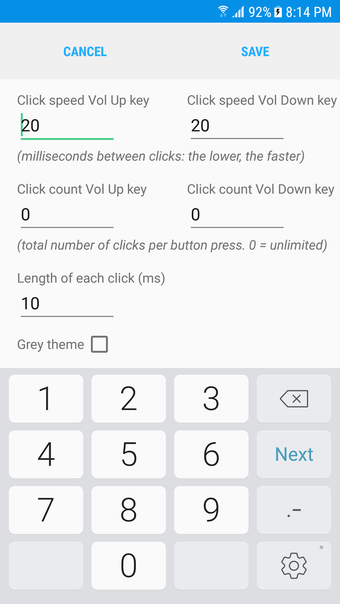
Even compared to similar apps, this auto-clicker app is a single-feature fare and relies on your device's volume keys to offer auto-clicking functionalities. You can configure your Volume Up and Volume Down buttons separately to simulate clicks up to 1000. You can also set an interval between each one, measured in milliseconds.
Another standout features
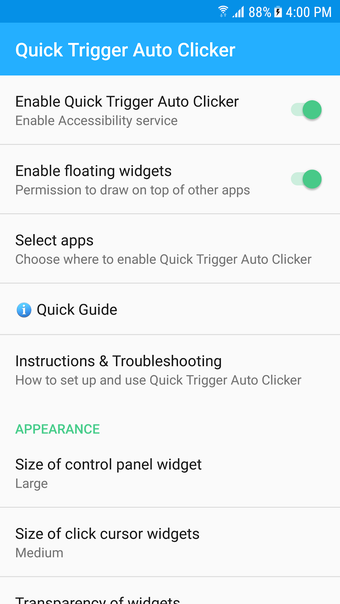
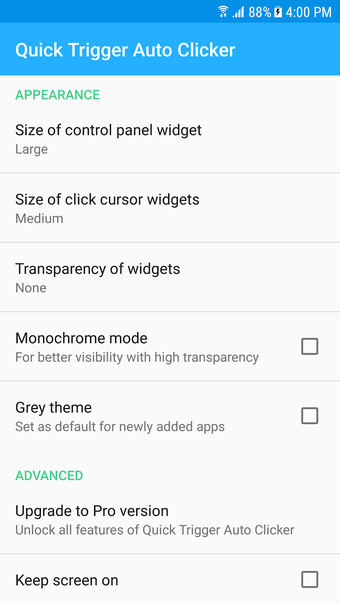
Volume Key Auto Clicker also offers extensive customization options, enabling you to tailor auto-clicking settings to your specific requirements. Parameters such as the number of clicks per second, screen click location, and duration can all be finely adjusted to meet individual needs. You can also add a floating widget so you can access it anywhere. From there, you can customize the look of its control panel to enable its functions, including size, transparency, and color.
Limitation to consider
Volume Key Auto Clicker takes full advantage of Android's Accessibility services, completely changing how we interact with our devices. By cleverly recognizing volume button clicks and converting them into touch gestures, it allows for automated interactions without any typing interruptions. In doing so, the app not only simplifies multitasking but also ensures user privacy by steering clear of logging keyboard inputs.
However, there's an important limitation to consider with Android's accessibility setup. Whenever you trigger a click with the volume keys, it disrupts any ongoing manual touch. This can be tricky in gaming environments where you need continuous screen contact, such as maintaining character movement while performing other actions. Being mindful of this restriction helps manage expectations, allowing users to make the best use of the app in suitable contexts.
Latest version and update info
Volume Key Auto Clicker’s most recent stable release remains version 1.1.6, which was last updated in late 2021 but continues to be distributed and updated by third-party APK sites as of late 2025. This APK can be downloaded directly from mirrors outside the Play Store, and it continues to support configurations like up to 1000 clicks per second and a floating control panel to place click widgets anywhere on the screen. Because the version hasn’t been updated officially in a few years, users should watch for community-reported forks or newer releases—but always download from trusted sources to avoid modified packages.
Install status and availability
According to app distribution data, Volume Key Auto Clicker has been installed over 500,000+ times across Android devices, despite no longer being available on the Google Play Store. It was officially unpublished from the Play Store around May 2025, but APK repositories still host the installer for Android 7.0 and above. The app maintains a moderate user rating (~3.6/5) across nearly 1,800 reviews, indicating that while many find it useful, some users encounter limitations or mixed performance depending on their device or Android version.
Usage tips for compatibility
Many users report that enabling the correct permissions and adjusting settings can significantly help Volume Key Auto Clicker work more reliably on certain Android skins like MIUI or newer OS versions. For example, display overlay permissions and “display pop-up windows while running in the background” must often be manually enabled for the control panel to appear properly, especially on Xiaomi or other heavily customized devices. Additionally, because it relies on accessibility services, occasional issues with activation or touch interruption occur more on certain Android versions—switching off gesture navigation or adjusting accessibility settings can sometimes mitigate this.
Community feedback and concerns
Despite its utility, community threads highlight a number of common user-reported issues with auto-clicker apps like this one. Users across forums mention that auto-clicker tools—including Volume Key Auto Clicker—may require re-enabling Accessibility permissions after system updates or even crash unexpectedly on certain devices. There are also anecdotal reports of touch screens becoming temporarily unresponsive after heavy auto-click use, suggesting that rebooting the device can sometimes be necessary to restore normal function after intense use sessions. These practical insights highlight the importance of managing permissions carefully and being prepared for occasional troubleshooting.
One trick pony
Volume Key Auto Clicker by Phone Phreak is a straightforward mobile utility offering customizable auto-clicking through device volume keys. Unlike competitors, it simplifies functionality to a single trigger event, enhancing ease of use for beginners. While interrupting touch input during operation can be inconvenient, its robust customization options, including a floating widget for accessibility, cater well to diverse user preferences.




.png)